

Click to Call
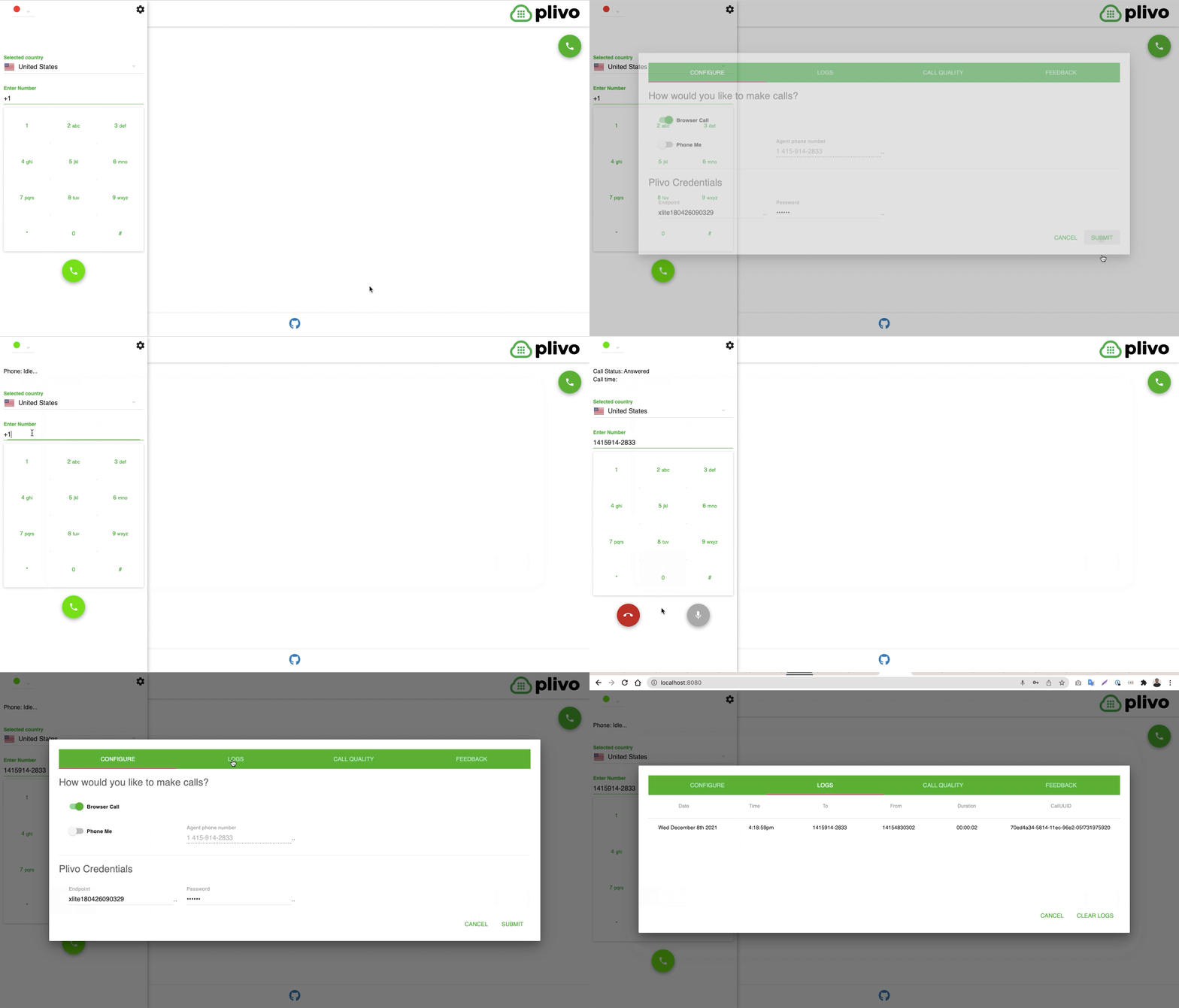
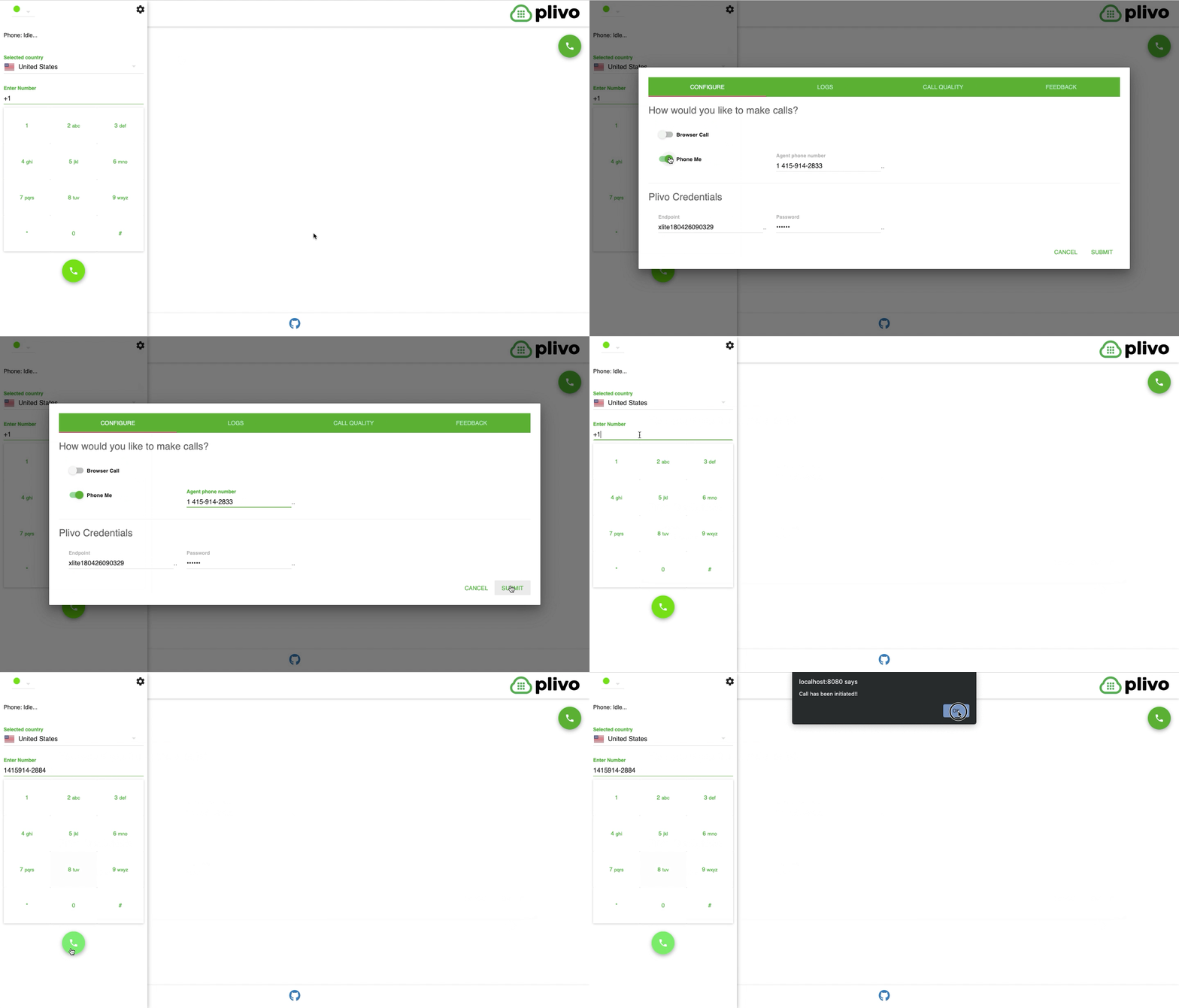
Click-to-call enables your website users to engage with your support and sales teams on the website itself. Sometimes they want to speak to someone via their handset but initiate the call online or talk to someone directly from the website. You can implement this click to call use case using Plivo’s Browser SDK.How it works
- Browser call
- Click to call
Prerequisites
To get started, you need a Plivo account — sign up with your work email address if you don’t have one already. You must have a voice-enabled Plivo phone number to receive incoming calls; you can rent numbers from the Numbers page of the Plivo console, or by using the Numbers API. Click to call requires JavaScript; we recommend using Node.js. If this is your first time triggering a PHLO with Node.js, follow our instructions to set up a Node.js development environment and a web server and safely expose that server to the internet.Create a PHLO to handle call logic
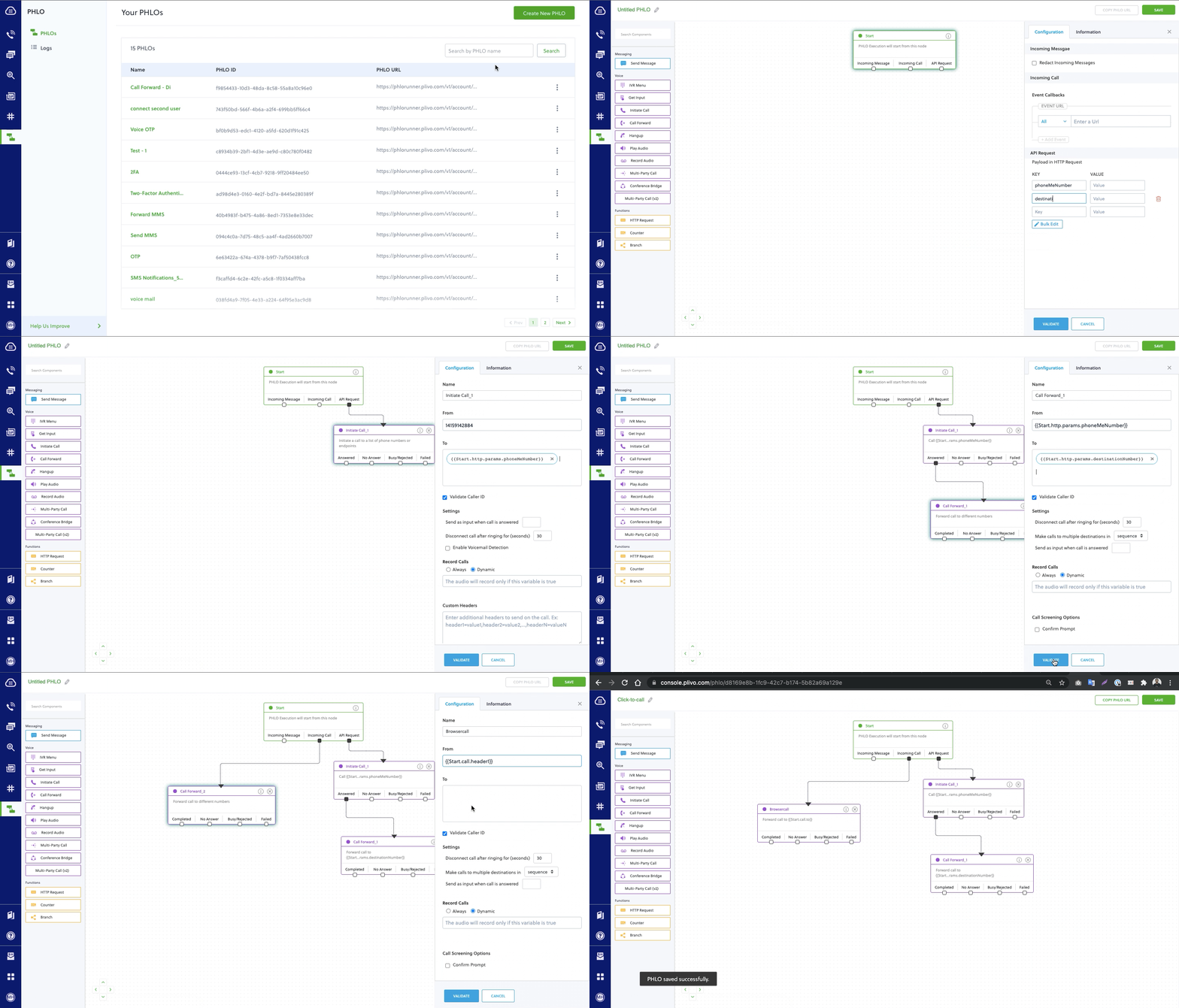
- Click Create New PHLO.
- In the Choose your use case pop-up, click Build my own. The PHLO canvas will appear with the Start node.
The Start node is the starting point of any PHLO. It lets you trigger a PHLO to start upon one of three actions: incoming SMS message, incoming call, or API request.
-
Click the Start node to open the Configuration tab, and then enter the information to retrieve from the HTTP Request payload — in this case key names are
destinationNumberandphoneMeNumber. The values will remain blank as we will receive them when the request is made by the browser. - Validate the configuration by clicking Validate. Do the same for each node as you go along.
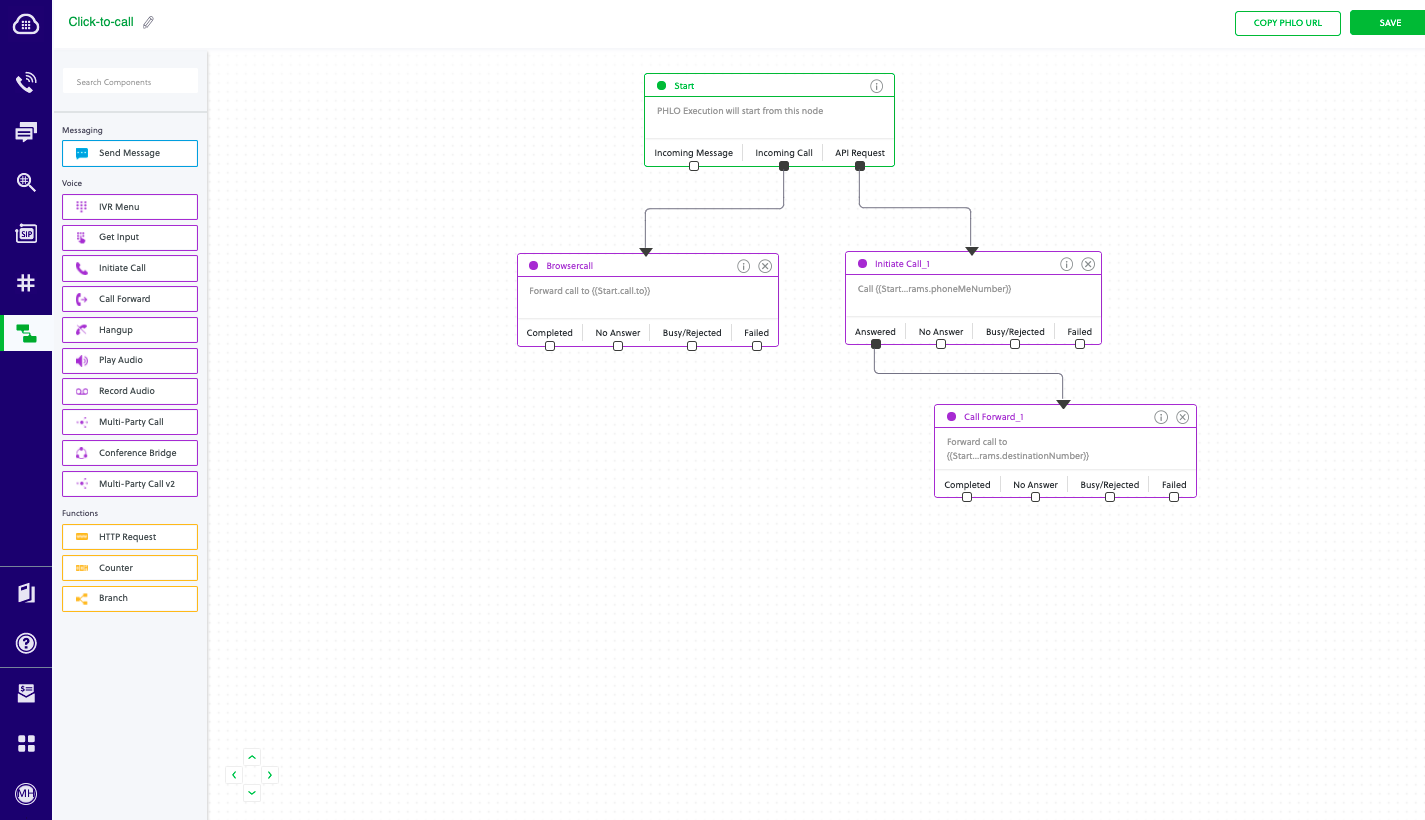
- From the list of components on the left side, drag and drop the Initiate Call component onto the canvas. This adds an Initiate Call node onto the canvas. When a component is placed on the canvas it becomes a node.
- Draw a line to connect the Start node’s API Request trigger state to the Initiate Call node.
- In the Configuration tab of the Initiate Call node, give the node a name. To enter values for the From and To fields, enter two curly brackets to view all available variables, and choose the appropriate ones.
- From the list of components on the left side, drag and drop the Call Forward component onto the canvas. Draw a line to connect the Answered trigger state of the Initiate Call node with the Call Forward node.
- Configure the Call Forward node to initiate call forward to another user. To enter values for the From and To fields, enter two curly brackets to view all available variables, and choose the appropriate ones.
- After you complete and validate the node configurations, give the PHLO a name by clicking in the upper left, then click Save.
Set up the demo application
Download the demo application from GitHub and follow the setup instructions in the README:Click-to-Call Demo
Complete demo application with Browser SDK and PHLO integration
Assign the PHLO to a Plivo number
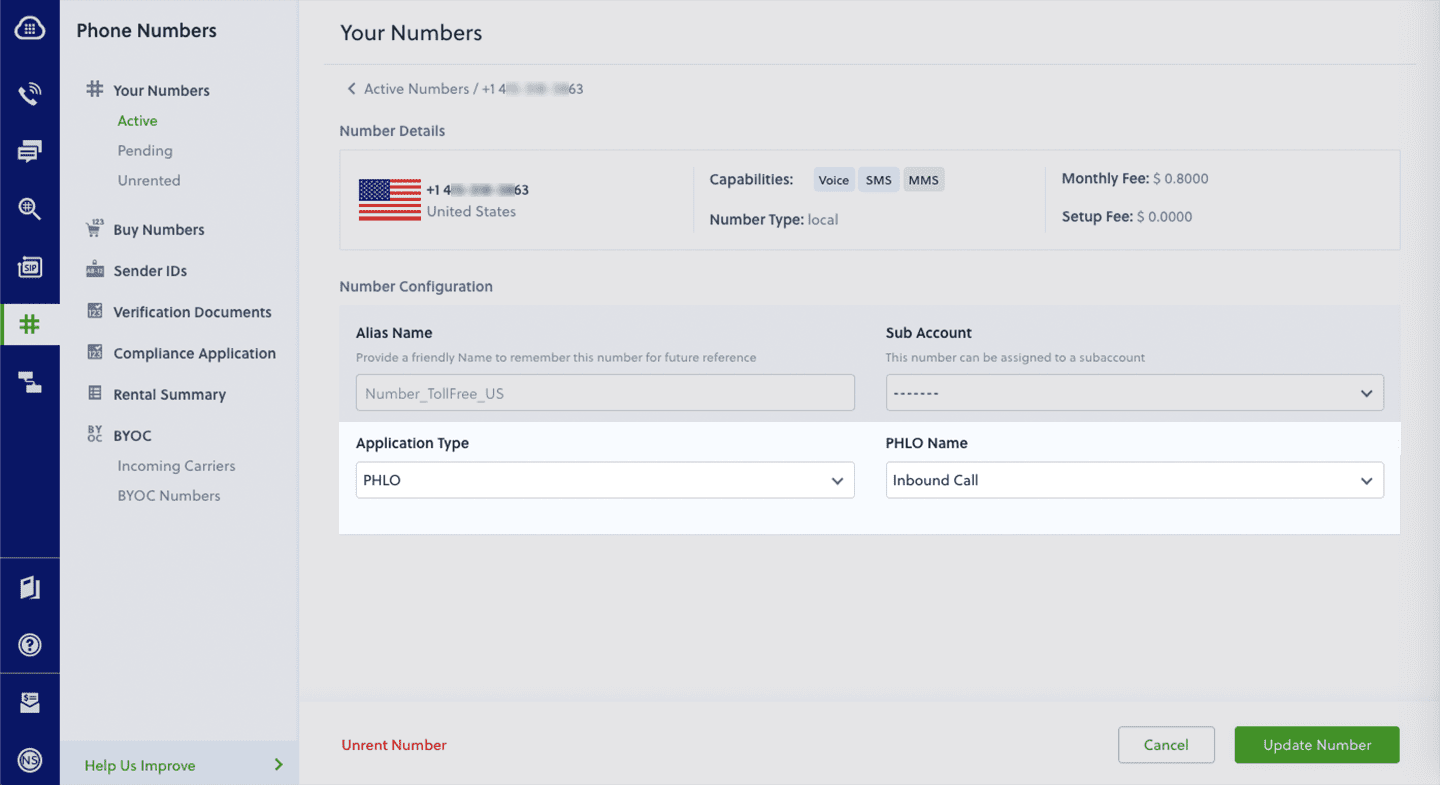
Once you’ve created and configured your PHLO, assign it to a Plivo number.- On the Numbers page of the console, under Your Numbers, click the phone number you want to use for the PHLO.
- In the Number Configuration box, select PHLO from the Application Type drop-down.
- From the PHLO Name drop-down, select the PHLO you want to use with the phone number, then click Update Number.
Test
After setting up the demo application, you should see your basic server application running athttp://localhost:8080/. Set up ngrok to expose your local server to the internet. Now make a call from your browser-based application to test it.
If you’re using a Plivo Trial account, you can make calls only to phone numbers that have been verified with Plivo. You can verify (sandbox) a number by going to the console’s Sandbox Numbers page.
Changelog
We document all notable release changes to the Browser SDK on this page. We base the format on Keep a Changelog, and this project adheres to Semantic Versioning.Release Process
We release all changes to beta first before updating to a stable release at least two weeks later, and we update all changes on this page. All past releases are URI accessible from links below and immutable, unless explicitly stated.Browser SDK V2.2
Browser SDK V2.2
Version v2.2.20 Aug 25, 2025
For detailed release notes, see the GitHub releases page.Version v2.2.19 Jul 14, 2025
For detailed release notes, see the GitHub releases page.Version v2.2.19-rc.1 Mar 28, 2025
Feature:- Added: Added a mechanism to check if the input and output devices are same/different based on the device group id and device label name for better debugging.
- Fixed: Incorrect I/O device data sent to call-insights when input device is changed during idle state.
- Fixed: Output Audio playing through the built-in speakers even when the default output device is changed.
Version v2.2.18 Mar 12, 2025
Feature:- Added: Introduced a mechanism to fetch the noise reduction model (script) from the local file system instead of Plivo CDN:
- The file path can be provided using the noiseReductionFilePath flag during initialization
- If no file path is provided, the SDK will fetch the model from Plivo CDN by default
- Fixed: Added logging to verify whether the device change event is trusted.
- Fixed: Updated the URL for fetching the RNNoise processor.js file.
- Fixed: Create and send a copy of the connectionInfo object in the onConnectionChange event.
Version v2.2.17 Jan 23, 2025
Bug Fixes:- Fixed: Remote Audio Fails to Play Through the Default Device After Bluetooth Disconnection.
Version v2.2.16 Jan 16, 2025
Feature:- Added: Added support for JSON Web Token (JWT) login with new methods: loginWithAccessToken and loginWithAccessTokenGenerator.
Version v2.2.15 Oct 03, 2024
Feature:- Added: A new event named CALL_STATS_DUMP has been introduced, which sends complete dump of getStats() API to call insights.
- Fixed: Invalid state error: 8 on calling the logout directly after call is ended.
Version v2.2.14 Sep 19, 2024
Feature:- Added: A new event named onCallConnected has been introduced, which is triggered when the PSTN callee starts ringing.
Version v2.2.13 Aug 22, 2024
Bug Fixes:- Fixed: Removed unnecessary dependency.
Version v2.2.12 Jul 24, 2024
Bug Fixes:- Fixed: Renamed DOMError to DOMException in the underlying JsSIP library to support latest Typescript versions.
Version v2.2.11 Jun 07, 2024
Bug Fixes:- Fixed: Enhanced call handling functionality to support multiple executions of the call() method.
Version v2.2.10 May 22, 2024
Bug Fixes:- Fixed: Improved error handling by emitting “LoginFailed” event upon unsuccessful creation of User Agent (UA).
- Fixed: Added a check to prevent sending DTMF signals when there is no internet connection.
- Fixed: Enhanced WebSocket connection optimization and improved fallback mechanisms.
- Fixed: Streamlined the process for reconnecting active calls during network changes.
- Fixed: Improved SDK reconnection logic to prevent redundant WebSocket connections.
- Fixed: Implemented a fix for the graceful disconnection of calls when a network switch occurs while the call is in the ring state.
- Fixed: Implemented an internet access check prior to registration.
- Fixed: Limited the Logout() function to execute only during active sessions.
- Added: Enhanced the callinfo object by introducing new attributes: Reason, Protocol, ErrorCode, and Originator.
- Added: Implemented Plivo STUN Servers to enhance reliability via the ‘usePlivoStunServer’ flag.
- Added: The reason for disconnection/connection is now published with the onConnectionChange event.
- Added: Introduced helper methods (isRegistered, isConnecting, and isConnected) for checking the client connection status.
- Added: Introduced a new event ‘remoteAudioStatus’ that signifies the reception status of audio packets from the remote caller.
- Added: Introduced a noise suppression feature to enhance audio quality by eliminating unwanted background noise during active calls.
- Added: onMediaPermission event will be triggered when media permission is revoked.
- Added: Users will receive a mediaMetric event when speaking while the SDK is muted.
Version v2.2.9 Sep 29, 2023
Features:- Added: A new useDefaultAudioDevice flag for using the system’s default audio device.
- Fixed: Removed support for the getStats API, as it is no longer available in Chrome versions 117 and beyond.
- Fixed: Removed the predetectOWA functionality.
- Fixed: Issue on audio input/output device mismatch on windows platform.
Version v2.2.8 Sep 12, 2023
Features:- Added: A refreshRegistrationTimer flag for user-configurable periodic re-registration by the SDK.
- Added: An onDtmfReceived event triggered when the SDK receives DTMF tones.
- Added: Enhanced remote debugging with the collection and transmission of logs to Plivo servers.
- Added: Plivo STUN servers to ensure stable connections.
- Added: A CALL_RINGING event signaling the initiation of incoming/outgoing call ringing to Plivo.
- Fixed: Corrected the handling of stir-verification in incoming call headers.
- Fixed: Fixed audio level discrepancies that occurred when changing input/output devices.
- Fixed: Removed DOMError to support latest Typescript versions.
- Fixed: Restored functionality for incoming calls with PCMU codec.
- Fixed: Prevented SDK from logging out when re-registration timed out.
- Fixed: Reduced the time for firing the onConnectionChange event with a disconnected state to within 10 seconds.
Browser SDK V2.1
Browser SDK V2.1
For older releases in the V2.1 series, see the GitHub releases page.
Browser SDK V2.0
Browser SDK V2.0
For releases in the V2.0 series, see the GitHub releases page.