

Submitting a toll-free verification request via APIs
Here’s how to use Plivo’s APIs to submit a verification request for your existing SMS-enabled toll-free numbers.Java
Prerequisites To get started, you need a Plivo account — sign up with your work email address if you don’t have one already. If this is your first time using Plivo APIs, follow our instructions to set up a Java development environment.Toll-free verification status: from unverified to approved
The status of a toll-free, SMS-enabled number that you rent from Plivo is s set to unverified by default. The status will change to pending_verification when you submit the details required for verification. Messages sent from a number that’s listed as pending_verification may still be delivered. However, these messages are subject to carrier scrutiny and filtering and could be blocked. If your details are validated and your messages are approved, the status of the verification request changes to approved. If messages you intend to send are not allowed on the channel, or if the business details you provide cannot be validated, the status will change to unverified. As of November 8, 2023, unverified toll-free numbers cannot send messages to users in the US and Canada. These messages will be rejected by the carriers.Submitting your business details
It is required to create a Plivo profile and use the profile_uuid to start the toll-free verification process via API. Your profile should contain accurate, up-to-date business details. Failing to provide these details using our profile APIs will cause your request to be rejected. Reseller submission If you are a reseller, you need to create a profile for your business first. This should be your primary profile. For each customer on whose behalf you intend to send messages, you should create a secondary profile. The profile_uuid of the relevant secondary profile should be submitted for toll-free verification along with the toll-free number you intend to use on their behalf. This is similar to the 10DLC registration process for resellers. What does this look like in practice? Consider a hypothetical reseller, Ovilp Corp., that provides a toll-free messaging platform for organizations that send messages in the US and Canada. Ovilp’s customers are hospitals and medical practitioners that might send messages such as- appointment alerts for patients;
- marketing announcements to customers who have opted-in;
- and two-factor authentication (2FA) codes for individuals to use to log in to patient portals.
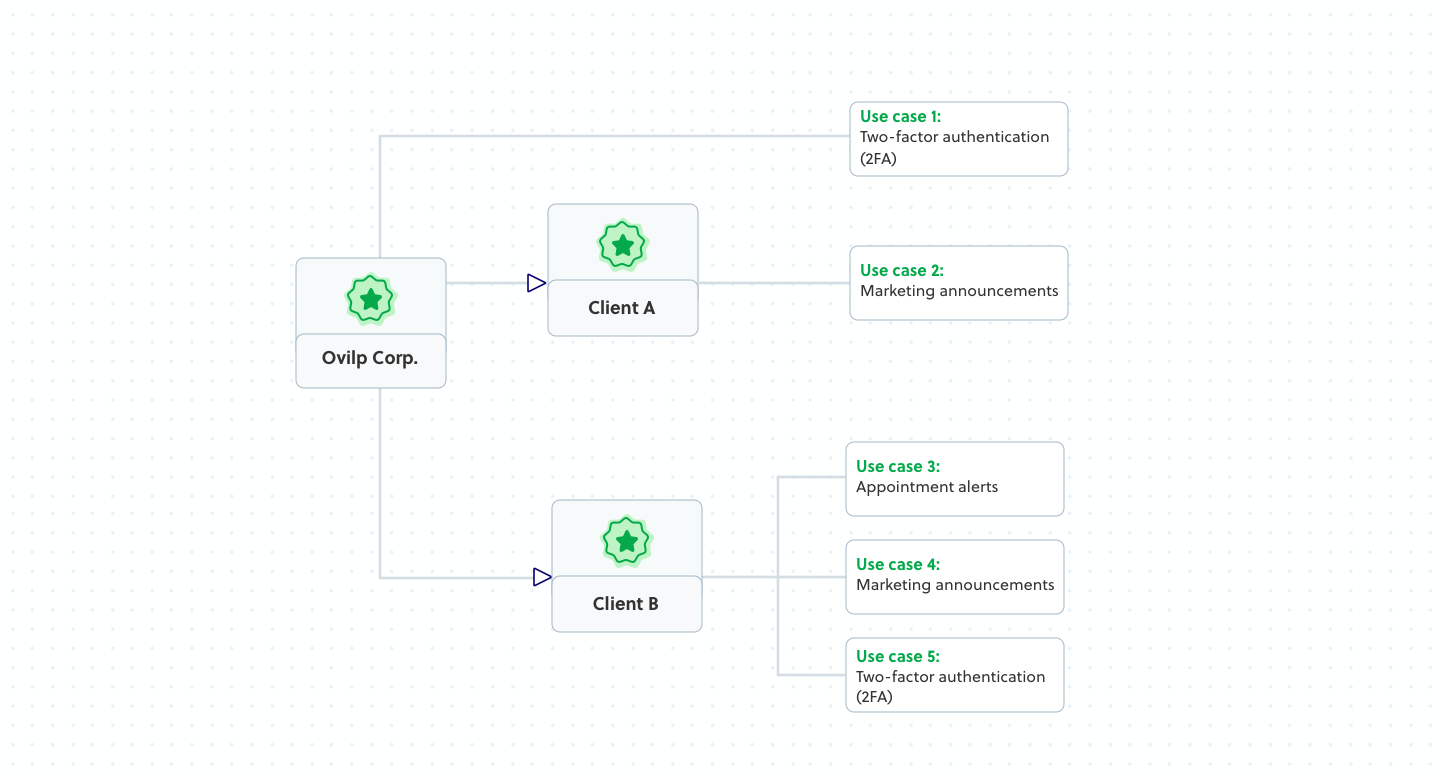
- Create a primary profile with Plivo.
- Use the profile_uuid and submit its 2FA use case for verification.
- Create a secondary profile with Plivo for Client A.
- Use the secondary profile_uuid and submit for A’s marketing use case.
- Create a secondary profile with Plivo for Client B.
- Use the secondary profile_uuid and submit a verification request for B’s use cases.
- Toll-free verification for B’s use cases can be submitted through a single verification request as the verification APIs support the submission of multiple use cases through a single verification request.
Submitting message details
Toll-free number Use the number field to submit one toll-free number for verification per API request. Resellers can submit one toll-free number for each end user they service. Use case and use case summary The list of allowed use cases is outlined below.
Specific use cases are not allowed on toll-free numbers.
- Deceptive marketing, including:
- Unsubstantiated claims, such as when a business claims that a product performs a certain way that it does not, accomplishes certain things it cannot, or brings an untrue benefit to consumers.
- Comparison inconsistencies, or situations in which a business says its product is comparable to brand-name products without sufficient evidence.
- Bait-and-switch tactics, or when a business markets a product it does not intend to deliver in terms of quality/function.
- Green or eco-friendly terms, or when a business advertises its products as environmentally-friendly or “green” despite knowing that goods are not produced under eco-friendly guidelines.
- False “made in the U.S.A.” claims.
- Frauds and scams, including:
- Smishing, or SMS phishing scams, are fraudulent and deceptive messages sent via SMS to trick recipients into divulging sensitive personal information, financial details, or clicking on malicious links.
- Tax refund scams in which fraudsters pose as government agencies (like the IRS) and send text messages to individuals, claiming that they are eligible for a tax refund.
- Prize and lottery scams that make recipients believe they have won a contest or lottery, and then demand that the recipient pay or provide personal data to claim the winnings.
- Fake package delivery scams like SMS spoofing that impersonate reputable companies like Amazon and USPS.
- Financial scams in which scammers promise substantial—albeit fraudulent—investment opportunities, enticing recipients with returns that are too good to be true.
- Charity scams that exploit people’s goodwill. They are often from individuals or groups who pose as legitimate charity organizations to deceive people into donating to their malicious cause.
- Job offer scams that trick recipients into paying a specific amount to land a job. They may also persuade recipients to contact a number or click a link to accept a job offer.
- Romance scams in which scammers create fake online personas to manipulate and exploit unsuspecting people emotionally and financially.
- Government impersonation SMS scams where cyber attackers send fraudulent text messages pretending to be government officials or agencies.
- Tech support scams in which scammers pretend to be real tech support representatives from well-known companies.
- Content related to SHAFT (sex, hate, alcohol, firearms, and tobacco)
- Cannabis promotion/sale
- Debt relief
- High-risk financial services
- Third-party lead generation services
- Affiliate marketing /real estate marketing
- Gambling
- VERBAL
- WEB_FORM
- PAPER_FORM
- VIA_TEXT
- MOBILE_QR_CODE
- 1,000
- 10,000
- 100,000
- 250,000
- 500,000
- 750,000
- 1,000,000
- 5,000,000
- 10,000,000+
What do the different statuses mean?
Check the status of your toll-free verification via API. A callback with the updated status is sent to the callback_url if it is provided while submitting the request.